Best Hygrometer for Grow Tent: 5 Accurate Thermometer Picks
A grow tent can change from comfortable to stressful conditions faster than the surrounding room. Grow lights raise the temperature, plants release moisture, irrigation increases evaporation, and exhaust fans repeatedly replace the enclosed air. Without dependable measurements, ventilation and humidity adjustments become guesswork.
The best hygrometer for grow tent use should measure both relative humidity and temperature, respond quickly to environmental changes, and sit close to the plant canopy without being exposed directly to humidifier mist or intense light. Remote alerts and historical charts are useful, but a clear local display may be more practical for growers who inspect the tent regularly.
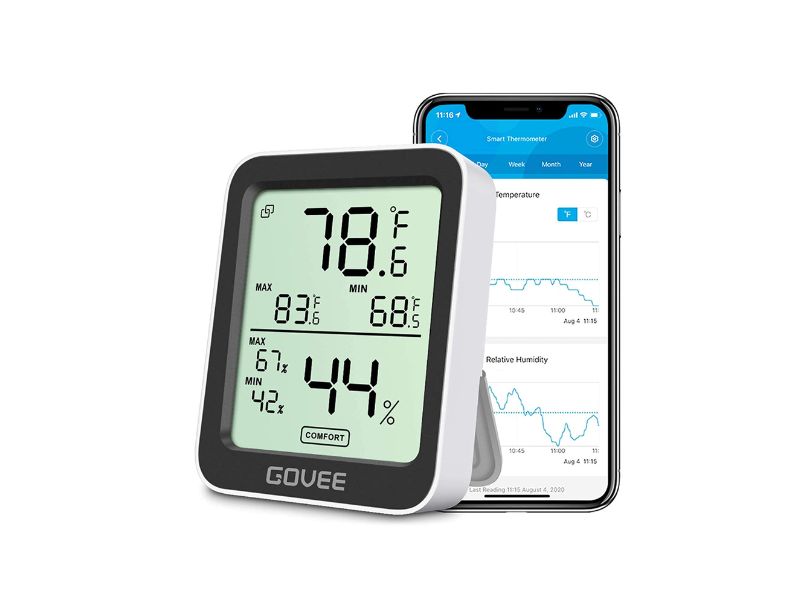
My primary recommendation is the Govee H5075 Bluetooth Hygrometer Thermometer. It combines a readable display with Bluetooth monitoring, customizable alerts, and historical data storage. This makes it easier to identify overnight humidity increases, daytime heat peaks, and ventilation patterns instead of relying only on the current reading.
The ThermoPro TP50 is a simpler alternative with an established design and no app requirement. The AC Infinity CLOUDCOM B1 is the most grow-tent-focused option because it adds a corded sensor and vapor pressure deficit monitoring. SensorPush emphasizes compact wireless logging, while the INKBIRD ITH-20R keeps its receiver outside the tent and supports remote transmitters.
Every product in this guide works as both a thermometer and a hygrometer. That allows the same article to help readers searching for the best thermometer for grow tent monitoring as well as a reliable humidity gauge.
5 Best Thermometers and Hygrometers for Grow Tents
1. Govee H5075 Bluetooth Hygrometer Thermometer
Key Features
- Measures temperature and relative humidity
- Large integrated LCD screen
- Bluetooth app connectivity
- Custom temperature and humidity alerts
- Historical data storage and export
- Approximately two-second refresh response
- Swiss-made sensing component
- Multiple placement options
- Battery-powered operation
- Compact design for small and medium tents
The Govee H5075 offers a useful balance between immediate local readings and longer-term environmental tracking. The front display shows the current temperature and humidity, while the mobile app stores readings that can be reviewed as graphs.
That combination is valuable inside a grow tent. A current reading may look acceptable even though the temperature was too high several hours earlier or humidity increased substantially after the lights switched off. Historical data makes those patterns easier to identify.
The H5075 connects directly to a nearby phone through Bluetooth. It does not require a separate hub for local wireless monitoring. Custom alerts can notify the user when readings move outside selected limits, provided the phone is within the effective connection range.
Govee specifies approximately ±0.5°F temperature accuracy, ±3% RH humidity accuracy, and a response time of about two seconds. These specifications are suitable for general grow-tent monitoring, though individual units should still be compared with another dependable sensor before major environmental changes are based on small differences.
The integrated sensor means the complete device must remain inside the tent. Position it near canopy height but away from direct light, wet leaves, humidifier discharge, and strong fan airflow.
Do not place it directly on a pot or growing medium. Moisture evaporating from the container can create a localized humidity reading that does not represent the general canopy environment.
What I Like
- Shows readings locally and in an app
- Historical charts reveal day-and-night patterns
- Custom alerts reduce repeated manual checking
- Fast response to environmental changes
- Compact enough for small tents
- No additional gateway required for Bluetooth use
- Data can be exported for longer-term analysis
What I Do Not Like
- Bluetooth is not the same as internet-based monitoring
- The complete unit must remain inside the tent
- Direct condensation can affect sensor performance
- Phone alerts depend on connection range
- It does not directly control fans or humidifiers
The Govee H5075 is the strongest general recommendation for growers who want a simple display without giving up data logging and alerts. It is especially useful for diagnosing recurring temperature and humidity changes across the complete light cycle.
2. ThermoPro TP50 Digital Hygrometer Thermometer
Key Features
- Measures indoor temperature and humidity
- Large LCD display
- High and low records
- Approximately ten-second refresh rate
- Temperature accuracy around ±1°F
- Humidity accuracy around ±2–3% RH
- Dry, comfortable, and wet indicator
- Tabletop stand
- Magnetic back
- Hanging-mount option
- Uses one AAA battery
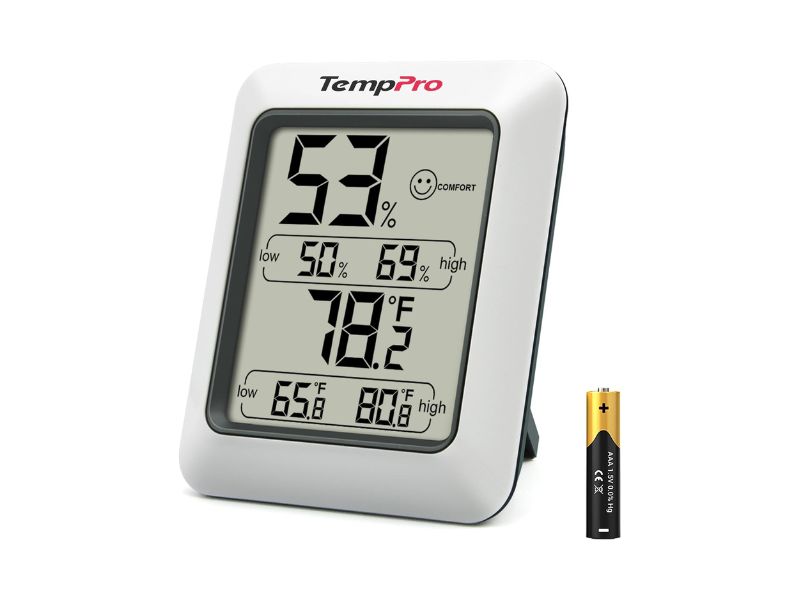
The ThermoPro TP50 is a straightforward choice for growers who do not need wireless connectivity. It displays the current temperature and humidity alongside recorded high and low values.
Those high and low records are useful when checking a tent once or twice per day. They can reveal whether conditions exceeded the current reading, although they do not provide the detailed timeline available from an app-based data logger.
The TP50 refreshes approximately every ten seconds and is rated for around ±1°F temperature accuracy and ±2–3% RH humidity accuracy. Its wide measuring ranges are more than adequate for normal indoor cultivation environments.
It can stand on a shelf, attach to a magnetic surface, or hang from a support point. The magnetic back may not attach directly to aluminum tent poles, so the hanging mount or tabletop stand may be more practical.
The comfort indicator is designed primarily for household use. A condition marked “comfortable” for a room is not necessarily correct for every plant stage. Growers should rely on their intended environmental range rather than the comfort icon alone.
The TP50 does not send alerts or store detailed charts. Its strength is simplicity: insert the battery, position it near the canopy, and read the display.
What I Like
- Very simple setup
- Clear local display
- High and low records
- Fast enough refresh rate for grow-tent use
- Flexible mounting options
- Low power consumption
- No account, phone, or wireless connection required
- Suitable as a backup sensor
What I Do Not Like
- No Bluetooth or Wi-Fi monitoring
- No historical graphs
- No remote alerts
- Integrated sensor limits placement flexibility
- Comfort indicator is not plant-stage specific
The ThermoPro TP50 is the best option for growers who want an affordable, readable monitor without apps or networking. It also works well as a second reference device for comparing another sensor’s readings.
3. AC Infinity CLOUDCOM B1 Smart Thermo-Hygrometer
Key Features
- Measures temperature and relative humidity
- Displays vapor pressure deficit
- Twelve-foot corded sensor probe
- Backlit LCD screen
- Bluetooth app monitoring
- Custom alerts and push notifications
- Historical graphs
- CSV data export
- Temperature and humidity calibration
- Daily high and low records
- Desktop, wall, and magnetic mounting
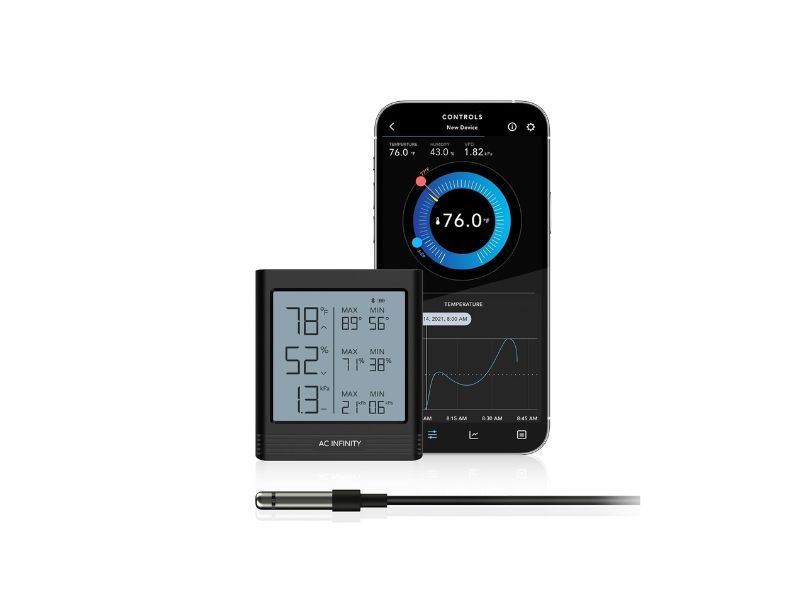
The AC Infinity CLOUDCOM B1 is designed more directly around grow rooms and grow tents than the other monitors in this article. Its main advantage is the twelve-foot corded probe.
The display can remain outside the tent while the probe hangs at canopy height. This makes the screen easier to read and keeps the main electronics away from direct humidity, irrigation, and condensation.
A corded probe also simplifies accurate placement. The sensor can move upward as the plants grow without relocating the full monitor or opening the tent whenever the display needs to be checked.
In addition to temperature and humidity, the CLOUDCOM B1 calculates VPD, or vapor pressure deficit. VPD provides a more connected view of temperature and relative humidity than either reading alone.
The included reading is based primarily on ambient conditions unless an appropriate leaf-temperature adjustment is applied. It should be used as an environmental reference rather than an automatic guarantee of correct plant transpiration.
Bluetooth connectivity provides alarms, historical graphs, calibration settings, and CSV exports through the AC Infinity app. The display can also show daily high and low values without requiring the app.
This model does not automatically control an AC Infinity fan or humidifier merely because it uses the same app. It is primarily a monitor; equipment automation requires compatible controllers and devices.
What I Like
- Designed specifically for grow environments
- Corded probe allows accurate canopy placement
- Display can remain outside the tent
- Includes VPD monitoring
- App alerts and historical graphs
- Temperature and humidity calibration
- Backlit local display
- Data export for environmental analysis
What I Do Not Like
- Bluetooth range depends on walls and tent position
- VPD can be misunderstood without leaf-temperature context
- Twelve feet of sensor cable requires organization
- It does not independently switch environmental equipment
- More settings than a basic grower may need
The CLOUDCOM B1 is the best specialized choice for growers who want the sensor inside the canopy and the display outside the enclosure. Its VPD, probe placement, calibration, and data-export features make it particularly useful for detailed environment management.
4. SensorPush HT1 Wireless Thermometer and Hygrometer
Key Features
- Compact Bluetooth temperature and humidity sensor
- Approximately one-minute measurement intervals
- More than two weeks of onboard data storage
- Mobile graphs and alert ranges
- Approximately 325-foot line-of-sight range
- Optional Wi-Fi gateway support
- Temperature range from -40°F to 140°F
- Humidity range from 0% to 100% RH
- Battery life commonly exceeding one year
- Small 1.57-inch square housing
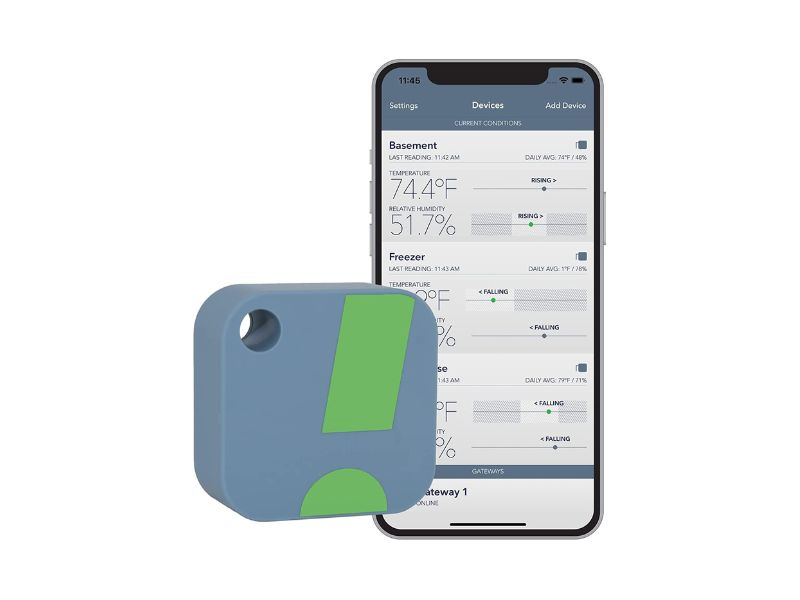
The SensorPush HT1 is designed primarily as a compact wireless data logger. Unlike the Govee and ThermoPro products, it does not provide a large built-in display. Readings are viewed through the mobile app.
This approach keeps the sensor small enough to hang discreetly near the canopy. It records data approximately once per minute and stores more than two weeks of readings internally. When the phone returns within Bluetooth range, the stored data can synchronize to the app.
SensorPush specifies typical temperature accuracy around ±0.5°F in its normal operating range and typical humidity accuracy around ±3% RH between 20% and 80% RH.
The optional G1 Wi-Fi Gateway can provide internet-based monitoring when the grower is away from home. Without the gateway, the HT1 is a Bluetooth device and requires a nearby phone to synchronize readings.
The HT1 is not waterproof. SensorPush also notes that prolonged exposure above 80% RH can temporarily offset humidity readings. That makes placement especially important in propagation tents or mushroom-style high-humidity chambers.
For ordinary plant grow tents, position it away from humidifier fog and condensation. Growers expecting frequent surface moisture may prefer a water-resistant sensor model rather than the standard HT1.
What I Like
- Very compact sensor
- Strong temperature accuracy
- Long onboard data history
- Detailed mobile graphs
- Alert-range support
- Long battery life
- Optional internet monitoring through a gateway
- Easy to add several sensors to one app
What I Do Not Like
- No full local display
- Wi-Fi monitoring requires a separate gateway
- Standard HT1 is not water-resistant
- Extended very-high-humidity exposure may affect readings
- One-minute sampling is slower than some display monitors
The SensorPush HT1 is best for growers who prioritize compact wireless logging and do not need to read conditions directly from the device. It becomes more capable with the optional gateway, but that increases the complete system cost.
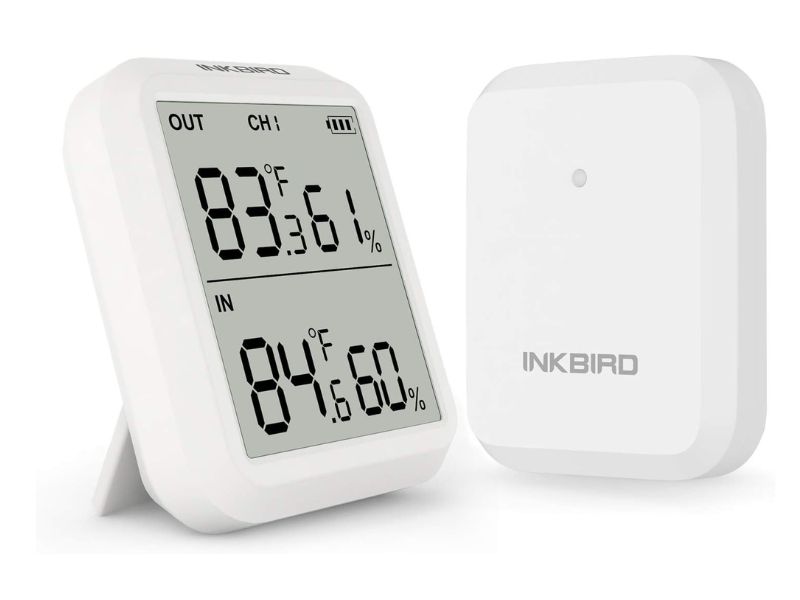
5. INKBIRD ITH-20R Wireless Thermometer Hygrometer
Key Features
- Separate wireless transmitter and receiver
- Measures remote temperature and humidity
- Receiver also measures local indoor conditions
- Approximately 300-foot line-of-sight transmission
- Updates approximately every ten seconds
- Supports up to three compatible transmitters
- Large receiver LCD
- Celsius and Fahrenheit display
- Wall-mount and tabletop options
- Optional external temperature probe
- Battery-powered operation
The INKBIRD ITH-20R uses a traditional wireless receiver-and-transmitter design. The transmitter remains inside the grow tent, while the receiver can stay in the room outside.
This is useful for growers who want remote readings without installing an app or relying on Bluetooth phone connectivity. The receiver shows the transmitter’s conditions as well as the conditions around the receiver.
INKBIRD specifies a line-of-sight range of approximately 300 feet and an update interval of around ten seconds. Tent fabric, walls, electrical equipment, and radio interference can reduce the practical range.
The system can support multiple compatible transmitters, allowing growers to monitor several tents or different locations within one large room. A second transmitter could also be placed near the floor or intake while another remains at canopy height.
Its specified accuracy is more modest than the leading products, at approximately ±1°C for temperature and ±5% RH for humidity. This is adequate for identifying broad changes but less suitable when decisions depend on very small humidity differences.
The transmitter includes an external probe for temperature measurements. That probe does not replace the main air-humidity sensor and should not be confused with a complete remote temperature-and-humidity probe.
What I Like
- Receiver can remain outside the tent
- Does not require a phone app
- Long claimed wireless range
- Fast update interval
- Supports several transmitters
- Displays indoor and remote conditions
- Useful for monitoring several tents
- Straightforward physical controls
What I Do Not Like
- Lower specified humidity accuracy
- No detailed app graphs
- No internet alerts
- Multiple transmitters may need to be purchased separately
- Receiver and sensor pairing adds setup steps
- External probe measures temperature rather than complete air conditions
The INKBIRD ITH-20R is useful for growers who want a dedicated receiver outside the tent. Its multi-transmitter design is practical for several enclosures, although its accuracy specifications are less precise than the other leading monitors.
Grow-Tent Thermometer and Hygrometer Comparison
| Product | Connection | Local Display | Remote Sensor | Data Logging | Alerts | Main Strength | Main Limitation |
| Govee H5075 | Bluetooth | Yes | No | Yes | Yes | Strong balance of display and app features | Bluetooth-only remote access |
| ThermoPro TP50 | None | Yes | No | High/low only | No | Simple and widely established | No remote monitoring |
| AC Infinity CLOUDCOM B1 | Bluetooth | Yes | 12-foot corded probe | Yes | Yes | Grow-tent placement and VPD | Does not directly control equipment |
| SensorPush HT1 | Bluetooth; optional Wi-Fi gateway | App only | Sensor is the remote unit | Yes | Yes | Compact long-term logging | Not water-resistant |
| INKBIRD ITH-20R | 433 MHz wireless | Receiver display | Wireless transmitter | Limited | No app alerts | Dedicated receiver and multiple sensors | Lower stated humidity accuracy |
The Govee H5075 provides the most balanced feature set for typical growers. ThermoPro emphasizes simplicity, AC Infinity provides the most cultivation-focused measurements, SensorPush prioritizes logging, and INKBIRD offers a dedicated wireless receiver.
Hygrometer vs. Thermometer: What Does a Grow Tent Need?
A thermometer measures temperature.
A hygrometer measures the amount of moisture in the air, usually shown as relative humidity.
A combined thermo-hygrometer measures both.
A grow tent should normally use a combined device because temperature and relative humidity affect one another. Warm air can hold more water vapor than cool air, so relative humidity may rise when the lights switch off even when no additional water has entered the enclosure.
Looking only at temperature may hide a humidity problem. Looking only at humidity may hide a heat problem. Both readings are required to understand the environment.
Why Temperature and Humidity Change So Quickly
Grow-tent conditions respond to several interacting factors:
- Grow-light power
- Driver location
- Exhaust-fan speed
- Intake-air temperature
- Humidifier output
- Dehumidifier operation
- Plant transpiration
- Irrigation frequency
- Open water surfaces
- Canopy size
- Room humidity
- Light schedule
During the lighting period, the fixture warms the air and leaf surfaces. Relative humidity may fall as the air temperature increases.
After the light switches off, the tent cools. Relative humidity can rise rapidly because cooler air has a lower moisture-holding capacity.
A monitor with historical graphs makes this light-on and light-off cycle easier to identify.
How Accurate Should a Grow-Tent Hygrometer Be?
For general grow-tent monitoring, a humidity accuracy specification around ±2% to ±5% RH is common among consumer devices.
A monitor does not need laboratory precision to show that humidity increased from a moderate level to an obviously excessive one. Greater accuracy becomes more important when:
- Comparing VPD targets
- Managing sensitive propagation
- Preventing condensation
- Operating automated humidity controls
- Diagnosing small environmental differences
- Comparing several canopy zones
Temperature accuracy around ±0.5°F to ±1.8°F is generally sufficient for ordinary indoor cultivation decisions.
Accuracy specifications do not guarantee that every unit will match perfectly. Two monitors positioned together may show slightly different readings because of sensor tolerance, airflow, heat from their electronics, or response speed.
Where to Place the Sensor
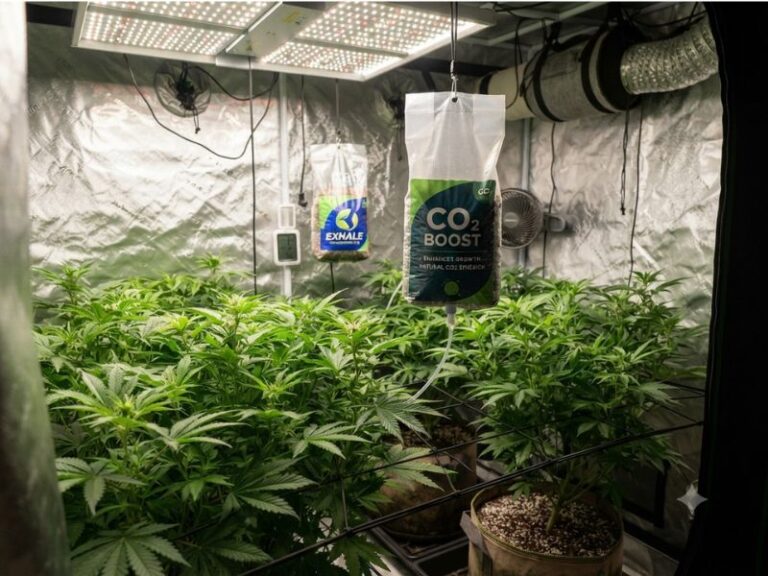
Place the primary sensor near the height of the upper plant canopy.
The sensor should measure the air experienced by the leaves, not the conditions at the tent floor or ceiling.
Avoid placing it:
- Directly beneath the grow light
- Against a hot LED driver
- In the humidifier’s visible mist
- In front of the exhaust intake
- Directly in a circulation fan’s airflow
- On wet growing medium
- Against the reflective tent wall
- Beside an open reservoir
- Under dripping irrigation lines
Direct light can warm the device housing and create a temperature reading higher than the surrounding air. A small shade can protect the sensor without blocking airflow.
As plants grow, raise the sensor so it remains close to canopy height.
Integrated Sensor vs. Corded Probe
Integrated sensor
An integrated monitor keeps the sensor, display, and battery in one housing.
Advantages include:
- Simple installation
- No probe cable
- Easy relocation
- Lower cost
- Fewer components
Limitations include:
- Display remains inside the tent
- Entire device is exposed to humidity
- Harder to position precisely
- Opening the tent may be required to read it
Corded probe
A corded probe remains inside while the display sits outside.
Advantages include:
- Precise canopy placement
- Easier display access
- Main electronics remain drier
- Simple height adjustment
- Useful for closed-tent checks
Limitations include:
- Cable management
- Probe can be displaced
- Cable may interfere with zippers
- Sensor must not touch leaves or wet surfaces
The AC Infinity CLOUDCOM B1 is the only product in this group with a long corded temperature-and-humidity probe.
Local Display vs. Bluetooth vs. Wi-Fi
Local display
A local display is the simplest option. It works without a network and provides an immediate reading.
It cannot notify the user when conditions change while no one is nearby.
Bluetooth monitoring
Bluetooth allows a nearby phone to download readings and receive alerts.
The effective range depends on walls, tent fabric, interference, and phone location. Bluetooth does not normally provide worldwide remote access by itself.
Wi-Fi monitoring
Wi-Fi or a connected gateway allows internet-based access from outside the home.
This is useful during travel or long workdays, but it adds setup complexity and often requires a separate gateway.
Choose connectivity based on the response you can actually make. A remote alert is valuable only when someone or an automated controller can correct the condition.
Understanding VPD
Vapor pressure deficit estimates the difference between the moisture pressure inside a leaf and the moisture pressure in the surrounding air.
VPD combines the effects of temperature and relative humidity into one value. It can help growers understand whether the air may encourage rapid or restricted plant transpiration.
However, accurate plant-level VPD should consider leaf-surface temperature, which may differ from the air temperature.
A monitor calculating VPD only from ambient temperature and humidity provides a useful approximation, not a complete measurement of the plant.
Do not ignore temperature and humidity simply because a device displays VPD. The underlying readings remain essential.
Why High and Low Records Matter
A current reading shows conditions at one moment.
High and low records can reveal:
- Daytime temperature peaks
- Overnight humidity spikes
- Exhaust-fan failures
- Humidifier overshoot
- Heater problems
- Open-tent disturbances
- Rapid seasonal changes
A full data graph provides more information because it shows when the change occurred and how long it lasted.
If a monitor shows an unexpectedly high maximum, reset the records and observe the next complete light cycle before changing several pieces of equipment simultaneously.
How Many Sensors Does a Grow Tent Need?
One sensor is usually sufficient for a small, evenly ventilated tent.
Two or more sensors become useful when:
- The tent is 4×8 or larger
- Several lights create separate heat zones
- The canopy is very dense
- One side is near an intake
- The driver is mounted inside
- Shelving creates multiple levels
- Propagation occurs above or below mature plants
- Conditions differ near the floor and canopy
Do not compare sensors placed in different microclimates and assume one is defective. First place them side by side for several hours.
Checking Sensor Consistency
To compare several monitors:
- Place them together in the same shaded location.
- Keep them away from fans and humidifiers.
- Allow enough time for the readings to stabilize.
- Compare temperature differences.
- Compare humidity differences.
- Repeat the comparison at another humidity level.
- Apply calibration offsets when the device supports them.
Do not hold a sensor in your hand during comparison. Body heat and moisture can change the reading.
A household salt test can provide a rough hygrometer reference, but it is not equivalent to professional calibration.
Protecting Sensors From Humidity and Condensation
Most indoor hygrometers measure humidity but are not waterproof.
High relative humidity does not always mean visible water will form. Condensation occurs when a surface becomes cool enough for moisture to collect.
Protect the monitor by:
- Keeping it away from humidifier fog
- Preventing contact with wet leaves
- Avoiding cold tent walls
- Mounting it above runoff trays
- Using a probe when possible
- Keeping the display outside the enclosure
- Wiping nearby condensation promptly
- Following the stated operating-humidity limits
A waterproof case placed around the sensor will block airflow and make the reading unreliable.
Common Grow-Tent Monitoring Mistakes
Placing the sensor at the tent ceiling
Hot air accumulates near the top, so the reading may not represent the canopy.
Leaving the sensor on the floor
The floor can be cooler and closer to water, producing a different microclimate.
Putting it in front of a humidifier
The monitor may report the humidity of the mist plume rather than the tent.
Putting it under direct light
Radiant heat can warm the device and create an artificially high temperature reading.
Relying on one current reading
Environmental problems may occur while the grower is asleep or away.
Assuming two sensors must match exactly
Consumer sensors have tolerances and different response speeds.
Confusing Bluetooth with Wi-Fi
A Bluetooth monitor generally cannot be checked from another city without a compatible gateway.
Using a household comfort icon as a plant target
Plant requirements do not always match human comfort ranges.
Adjusting several devices at once
Change one environmental variable, then observe the complete effect.
Frequently Asked Questions
What is the best hygrometer for a grow tent?
The Govee H5075 Bluetooth Hygrometer Thermometer is my primary recommendation. It provides a local display, Bluetooth alerts, and historical data without requiring a separate gateway.
The AC Infinity CLOUDCOM B1 is better when a corded canopy probe and VPD monitoring are priorities.
What is the best thermometer for a grow tent?
The best thermometer should also measure humidity because the two conditions interact continuously inside a grow tent.
The Govee H5075 provides strong general monitoring, while the ThermoPro TP50 is a simpler option for local readings.
Do I need both a thermometer and a hygrometer?
You need both measurements, but they do not need to come from separate devices.
A combined thermo-hygrometer measures temperature and relative humidity in one unit and is usually more convenient.
Where should I put a hygrometer in a grow tent?
Position the sensor near canopy height in a shaded area with normal airflow.
Keep it away from direct grow-light radiation, humidifier mist, exhaust suction, wet growing medium, and circulation-fan discharge.
Should the sensor hang above or below the canopy?
Place it close to the upper canopy without allowing leaves to touch it.
The objective is to measure the air surrounding the active foliage rather than the conditions at the floor or ceiling.
Is Bluetooth monitoring enough?
Bluetooth is sufficient when the grower remains within connection range and wants local alerts or historical synchronization.
Internet-based monitoring requires Wi-Fi functionality or a compatible gateway.
Do I need Wi-Fi monitoring?
Wi-Fi is useful during travel or long periods away from the grow space.
It is not required when someone regularly inspects the tent or environmental equipment is already controlled automatically.
How accurate should a grow-tent thermometer be?
A temperature accuracy around ±0.5°F to ±1.8°F is generally adequate for ordinary grow-tent management.
Consistency and correct sensor placement are as important as the published accuracy number.
How accurate should a hygrometer be?
Many reliable consumer monitors specify humidity accuracy around ±2% to ±5% RH.
Small differences are less important than identifying sustained trends, sharp spikes, and obviously unsuitable conditions.
Why do two hygrometers show different readings?
They may have different sensor tolerances, response times, airflow, temperatures, or positions.
Place them side by side in the same shaded location before deciding that one is inaccurate.
Why does humidity rise when the grow light turns off?
The air cools after the light switches off, reducing how much moisture it can hold before relative humidity rises.
Plants and wet growing media may also continue releasing moisture.
What is VPD on a grow-tent monitor?
VPD combines temperature and relative humidity to estimate the drying force of the air around plants.
For more precise plant-level interpretation, leaf temperature should also be considered.
Can a hygrometer control my exhaust fan?
A stand-alone hygrometer normally only measures and reports conditions.
Direct equipment control requires a compatible environmental controller, fan, humidifier, dehumidifier, or smart outlet.
Should I use more than one monitor?
A second monitor is useful in large tents, multi-level enclosures, dense canopies, or setups with separate heat zones.
It can also serve as a reference if the primary sensor appears inaccurate.
Can humidity damage a digital hygrometer?
Yes. A device may measure high humidity without being waterproof.
Direct condensation, humidifier spray, wet leaves, or pooled water can damage the electronics or affect the sensor.
Conclusion
Finding the best hygrometer for grow tent use means choosing a device that measures both temperature and humidity where the plants actually experience them.
My primary recommendation is the Govee H5075 Bluetooth Hygrometer Thermometer. It combines a readable display, fast response, customizable alerts, and historical graphs in one compact monitor.
The ThermoPro TP50 is better for growers who prefer a straightforward local display. The AC Infinity CLOUDCOM B1 provides a corded canopy sensor, VPD readings, and cultivation-focused data features.
The SensorPush HT1 is appropriate for compact wireless logging, while the INKBIRD ITH-20R allows a dedicated receiver to remain outside the tent.
The same products also satisfy readers searching for the best thermometer for grow tent monitoring because every recommended unit measures both environmental variables. Whichever model you choose, correct canopy-level placement is more important than mounting the most expensive sensor in the wrong location.

I’m Maya L. Greenwood, a lifelong plant lover who believes anyone can grow something beautiful with the right guidance. After years of testing soil mixes, pruning methods, irrigation tricks, and pest-safe solutions, I started EasyGardenTips.com to turn hard-won lessons into step-by-step advice. From seed starting and container gardens to composting and seasonal checklists, my goal is to make gardening simple, sustainable, and fun.